
Sparkloop: a guide for players and grown-ups
A free puzzle game for ages 7 and up, played in the web browser. Here is how it works, the ways to play, and the settings that help everyone join in.
What it is
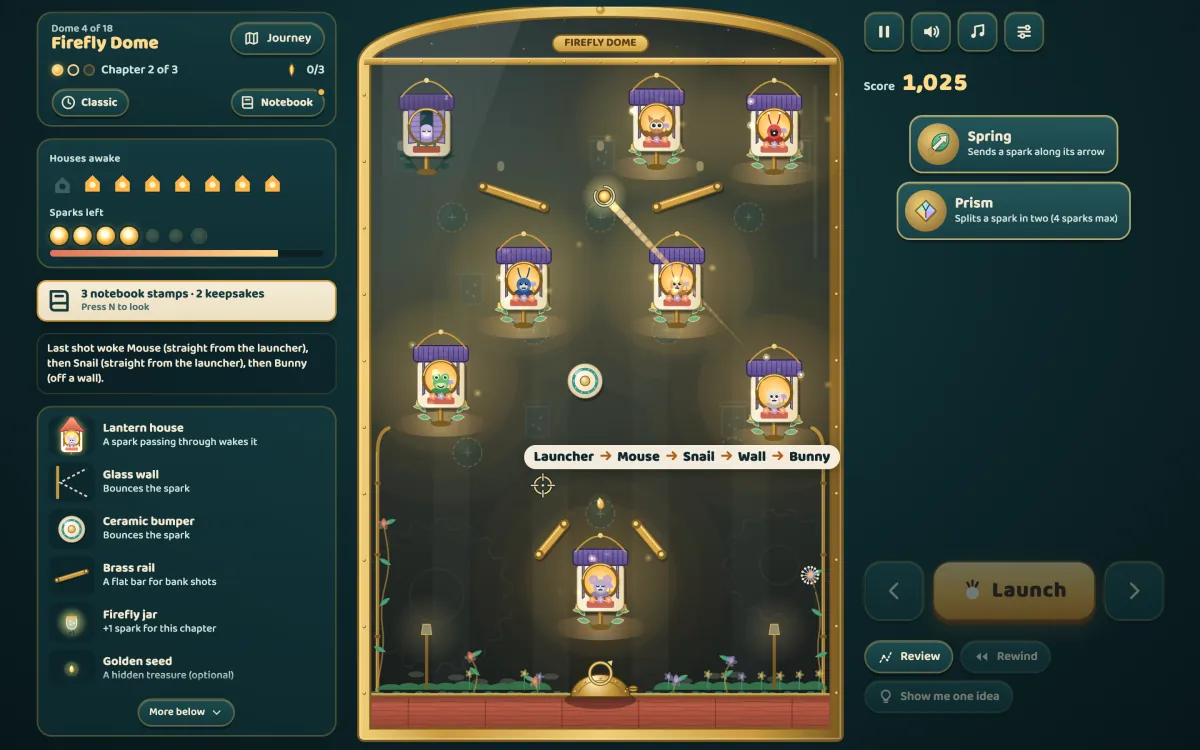
Under each glass dome sits a clockwork garden of lantern houses, each with a sleepy creature inside. You aim a spark from the launcher at the bottom and watch it ricochet off glass walls, ceramic bumpers and brass rails. Every house the spark passes through lights up and its creature wakes. Wake every house in the chapter with the sparks you have.
The Journey has 18 domes with three chapters each: 54 levels in all, with more houses in every chapter. Each dome brings something new to meet, such as seed pods, wired houses, switch bells and gates, magnet flowers, coloured glass and breeze vents. You finish a dome to open the next one.
How to play
- Aim. Point or drag on the board, or use the arrow buttons. A dotted preview shows where the spark will go for the first few bounces; after that, it’s up to you to picture the rest.
- Launch. Press Launch (or Space). Each launch uses one spark, which flies until the trough at the bottom catches it or its fuse runs out.
- Gadgets. As the Journey goes on, chapters begin with a choice of gadget cards: a spring, a prism that splits the spark in two, a portal, a mirror leaf or a bell bumper. Drag it from the tray onto a brass socket and turn it by its handle. You can move it between shots.
- Rewind. Once per chapter, Rewind puts everything back as it was before your last shot, with the spark returned.
- Review. Review draws the path of your last shot over the board, so you can see exactly where it went and what it hit.
- Show me one idea. When you’re stuck, the game works out one shot from where you are now. It sets the aim (and may move a gadget) and tells you how many houses it would wake; you still press Launch yourself.
Golden seeds hidden in some gardens are optional treasures, and sparks you don’t need add to the score.
Three ways to play, and the notebook
Choose a mode in Settings at any time; the chapter you’re on starts again in the new mode. Best scores are kept separately for each mode.
- Cozy: 8 sparks a chapter, a longer preview (4 bounces), a preview of a gadget’s effect while you carry it, and you never run out: when the sparks are spent you can top up and keep every house you’ve lit.
- Classic: 6 sparks a chapter and a 2-bounce preview. The garden as it was built.
- Clever: 6 sparks and a 1-bounce preview, with a par to beat for a Clever star. The last chapter of each dome is a harder Clever layout of its own.
The Discovery Notebook (the Notebook button, or N) keeps a page for every piece you’ve met, with a small moving demo, and stamps it once you’ve seen it work. It also records each garden you’ve visited, with its golden seeds, best scores and the machine you built there, which you can name. Keepsakes are small decorations earned by playing, with what each needs shown in advance. Nothing in the notebook gives hints about pieces you haven’t met yet.
Accessibility
- Keyboard: everything can be played without a mouse. Arrows aim (Shift for bigger steps), Space or Enter launches, G picks a gadget, Q and E turn it, U rewinds, R reviews, I asks for an idea, M opens the Journey map, N the notebook, P pauses and ? opens the settings and the full list of keys.
- Screen readers: the A key says the current aim and where the path goes, and the result of each shot is announced.
- Motion: follow your device’s reduced-motion setting, or choose Calm or Full in Settings. Calm keeps every bit of information with less movement.
- Colour-safe glass: coloured glass and colour houses always have a shape as well (a heart, a drop, a leaf), and the colour-safe option uses colours that stay apart for colour-blind eyes.
- Text size and contrast: Normal, Large or Larger text, and a high-contrast option with solid panels and brighter words.
- Sound: separate volumes for sound effects and music. They only change Sparkloop’s own sound, never the device’s volume.
- Hide score: for players who would rather just enjoy the garden.
Saving and coming back
Progress is saved in the browser as you play, on this device only: the domes you’ve finished, golden seeds, the notebook, keepsakes and settings. If you close the tab or reload in the middle of a chapter, you come back to the same chapter with the same houses lit, the same sparks left and your gadgets where you put them. (A spark that was still in the air comes back unspent, ready to launch again.) There is no account to make.
Clearing this site’s data in the browser, or playing in a browser window that doesn’t keep site data, means the progress isn’t kept. To start the whole journey again on purpose, use Settings → Grown-ups → Start over.
Devices
Sparkloop runs in a modern web browser on a computer, tablet or phone. On a touch screen, drag sideways anywhere on the board to turn the aim like a dial, or use the arrow buttons; lifting your finger never launches by accident. After the first visit it keeps working offline, and you can add it to your home screen to open it like an app.
Questions people ask
Is Sparkloop free?
Yes. It plays free in the browser, with no ads, no account and nothing to buy.
Who is it for?
Ages 7 and up, and grown-ups: it is a real puzzle game, and the later domes take some thinking. There is some short reading, so a younger player may like a grown-up alongside. Cozy mode is the gentlest way in. For little ones, our other games are calmer: Tiny Fingers (from 18 months), Under the Sea (ages 2–5) and Space Hop (ages 3–7).
Is there a time limit?
No. Take as long as you like to aim; the garden waits. Only a spark in flight has a fuse, so no shot goes on forever.
Is every level possible?
Yes. Every layout has been solved by the game’s own solver more than one way, within the sparks you have, and Show me one idea uses that same solver.
I’m stuck. What now?
Try Review to see where the last spark went, Rewind to take it back, or Show me one idea. Switching to Cozy gives you more sparks and a longer preview.
More from JenisStore
See the Tiny Fingers guide, the Space Hop guide, the Under the Sea guide and the Road Hop guide, or go back to all our free games. Ideas for a new gadget, and kind words, are always welcome at info@jenisstore.com.