
About Tiny Fingers: a parents’ guide
A free 3D toy Singapore for toddlers, played in the web browser. A few notes for parents, grandparents and caregivers.
Made for little ones from 18 months
Tiny Fingers is a calm, slow-paced game for little ones from 18 months, made to be enjoyed together with a grown-up. There are no timers, scores or ways to lose: every tap simply makes something happy happen.
Singapore’s HealthHub recommends no screen time before 18 months, and less than one hour a day from 18 months to 6 years, with a parent or caregiver alongside. We hope Tiny Fingers works best as a short, shared moment: sit together, point at the buses and the birds, name what you see, and then go and find the real thing outside.
What your child plays and learns
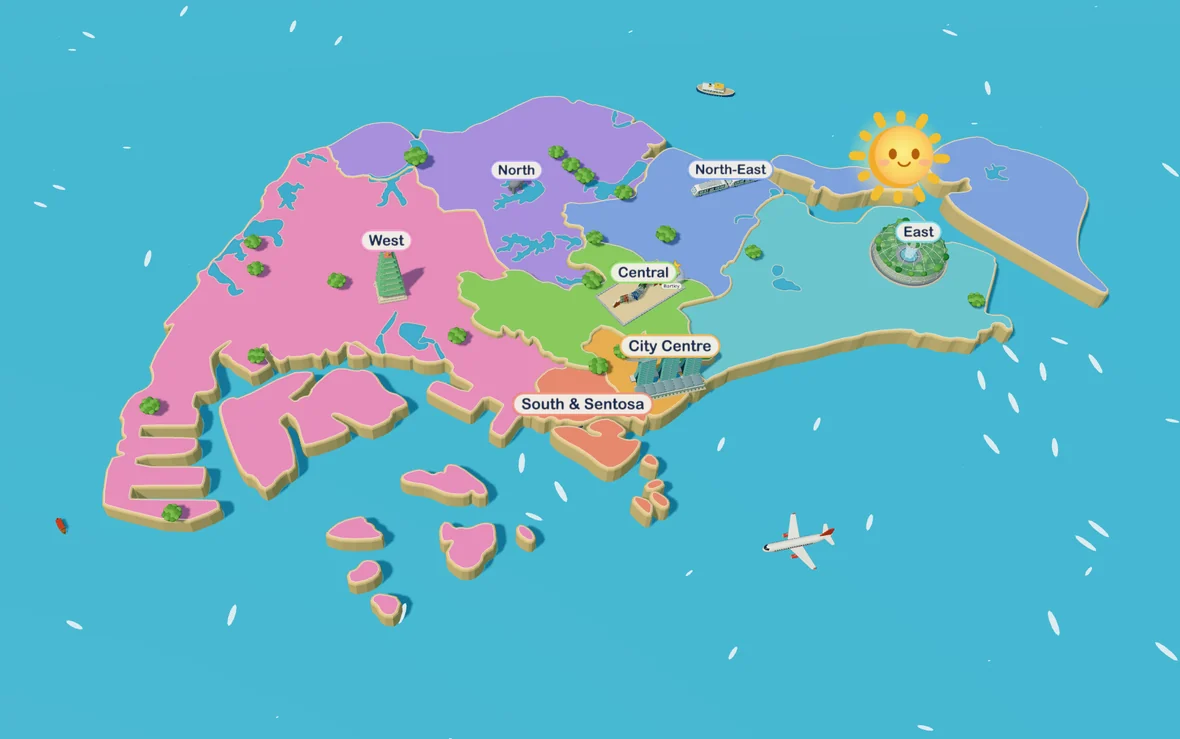
Tiny Fingers opens on a map of Singapore in seven colourful regions, from the City Centre to the North, the East, the West and Sentosa. Pick one of more than 30 places together, and the little one taps whatever they like: HDB flats, the green double-decker bus, MRT trains, taxis, planes at Changi Airport, the otters at the park, the animals at the zoo and the Night Safari, Sentosa beach and the lights of Marina Bay.
Every tap, click or key press makes something happen, with a gentle sound. Children practise cause and effect, learn the names of the everyday things they see from home, and can hear those names in English, Mandarin, Malay or Tamil. Places follow the real time of day, so the scene turns to night in the evening, and live weather can bring rain, clouds or sunshine. Festive days such as Chinese New Year, Hari Raya, Deepavali, Mid-Autumn, National Day and Christmas add their own decorations.
How to play together
- Sit side by side and let your child lead; there is nothing to finish or win.
- Name what they tap: “Bus! The bus is going to the interchange.”
- Choose a place you know, such as your own neighbourhood, the airport or the zoo, and talk about your last visit.
- Keep it short, and end with a walk to spot the real buses, trains and birds.
Devices, full screen and the home screen
Tiny Fingers runs in a modern web browser and is made first for a computer or laptop with a grown-up alongside; tablets work well, and phones work on a smaller screen. Every key on the keyboard does something, and a palm slap on a touchscreen is fine. After the first visit it keeps working offline.
The grown-ups menu opens when you press and hold the gear. It has the volume, spoken names and language, day or night, live weather, festive events and full screen. On an iPad or iPhone, tap Share and then Add to Home Screen: opened from its icon, Tiny Fingers plays full screen. On Android, choose Add to Home screen or Install from the browser menu.
A playful simulation, not a map
Tiny Fingers is a simplified, cartoon-style simulation of Singapore, created for very young children. The places, buildings, vehicles, animals, people, festivals and weather in the game are inspired by real life, but they are drawn from public information, memory and reference photos for play. They are not exact and not to scale. Map positions are approximate, and some details are simplified, combined, moved or left out so that small children can see and tap them easily.
Any inaccuracy or misrepresentation is entirely unintentional. If you notice something that looks wrong, or that could be shown more accurately or more respectfully, we would be grateful to hear from you at info@jenisstore.com, and we will gladly look into it.
Communities, faiths and festivals
Tiny Fingers celebrates the many communities, cultures, faiths and festivals that make Singapore home. Places of worship, traditions and celebrations are shown with care and respect, in a gentle and simple way suited to toddlers. They are not meant to depict any practice in detail.
Names and landmarks
Names of places, landmarks and attractions are used only to describe the real places that inspired each scene. Tiny Fingers is an independent project by JenisStore. It is not affiliated with, sponsored by or endorsed by any of the places, attractions, organisations or brands shown or named in the game, and all trademarks belong to their respective owners. The game shows no real logos or brand marks.
Live weather and map data
When live weather is switched on, the game shows current conditions using public data from the National Environment Agency via data.gov.sg (Singapore Open Data Licence), with Open-Meteo as a backup. The island map is based on the URA Master Plan 2019 via data.gov.sg (Singapore Open Data Licence). The positions of the sun and moon are calculated on your device. Weather and positions are approximate and for play only.
Privacy
Tiny Fingers needs no account or sign-up, and never asks a child for anything. Game settings, and your child’s name if you choose to enter one, stay on your own device and are never sent anywhere.
Counting visits
To learn which places and things families enjoy most, we count visits with Umami, an open-source analytics tool that runs on our own server in Singapore. It records which page or place is open, which kinds of things are tapped (for example “a bus” or “the Sultan Mosque”), how long the game is played while it’s on screen, the browser and device type, the language setting, the country, and the link or campaign tag that brought you here.
No cookies are used. Your internet address is used only to work out the country and an anonymous code that changes every month; the address itself is not stored. The game keeps a random play-session tag only for as long as the tab is open. We never record your child’s name, anything typed, recordings of the screen, or your precise location, and we don’t build a profile of you or your child. We look at totals, such as how many families played this month, and share only totals with others. Nothing is sold or used for advertising.
Visits from this device are counted (anonymously).
You can also switch “Count visits” off in the game’s grown-ups menu. Live weather uses public weather data and can be switched off there too.
Questions parents ask
Is Tiny Fingers free?
Yes. It plays free in the browser, with no account or sign-up.
Can my child leave the game by accident?
Leaving a place and opening the grown-ups menu both need a press and hold, and the leave guard asks before the page closes. Full screen helps too.
Does my child need to read?
No. Nothing needs reading and nothing is right or wrong: there are just things to tap, watch and listen to.
Are there other games for older children?
Yes: Under the Sea is an ocean game for ages 2–5, and Space Hop visits the real solar system with ages 3–7.
Get in touch
Tiny Fingers is free to play and is provided as is. Ideas for new places, corrections and kind words are always welcome at info@jenisstore.com.